At this moment, as you read this, the clock isn’t just running – it got a head start because you likely missed the starting gun. Your Dynamics 365 users are logging in right this second, and some, if not many, are logging in without the correct license. Microsoft knows it, so the question isnow whether you know it and will fix it on your schedule, or theirs. Ultimately, it’s imperative to understand how to prepare for Dynamics 365 license enforcement for businesses in 2026 and beyond because compliance after D365 license enforcement is crisis control, not strategy.
The reality is that the compliance landscape is changing as Microsoft enters a new era of strict license enforcement for Dynamics 365 Finance and Supply Chain Management (F&SCM), formerly Finance and Operations (F&O). What was once a flexible, audit-based model is now technically enforced: users must have the correct D365 license assigned in the Microsoft 365 Admin Center, or they will be locked out, which is far more thana simple helpdesk ticket. This code red situation creates the kind of operational crisis that ends up on the CFO’s desk by 9 AM because the cost of unplanned downtime during a critical business period, month-end, year-end, or a quarterly close, has run into hundreds of thousands of dollars within hours.
Still, it’s important to understand the reasoning behind this shift. This new D365 license enforcement model is part of Microsoft’s initiative to try simplifying license management in Dynamics 365 F&SCM by strengthening security and aligning user access with actual entitlements. With new enforcement triggers tied to your contract renewal date, you must prepare now to avoid disruption. This D365 license compliance guideconsolidates insights from:
- Microsoft’s September 2025 announcement on simplifying license management
- Avantiico’s Dynamics 365 licensing guide and licensing webinar materials
- Microsoft public pricing pages for Finance, Supply Chain, Commerce, HR, and Project Operations
Together, these resources provide a vital Dynamics 365 license compliance guide for 2026 and paint a clear picture of what’s changing (and how to get ahead of it.)
Avantiico's D365 licensing team conducts structured enforcement readiness assessments — identifying your specific exposure, your enforcement date, and a remediation plan you can execute. Most assessments complete in 2–3 weeks and give you clarity before the enforcement window closes. Don't Know Where to Start? Start with a Licensing Audit.

Table of contents
- How Does Dynamics 365 Licensing Work?
- What is Dynamics 365 License Enforcement?
- Why D365 License Enforcement Is Happening Now
- What’s New? 3 New Dynamics 365 Licensing Rules You Should Know
- Dynamics 365 License Enforcement Timelines: What’s the Difference Between Soft vs. Hard D365 License Enforcement?
- What D365 F&SCM Licensing Enforcement Means for Your Organization
- 8 Signs Your D365 Licensing Setup Is at Risk During Enforcement
- What Are Business Consequences of Not Preparing for License Enforcement in Dynamics 365 F&SCM? [ 4 Consequences ]
- The Three-Phase Framework for Dynamics 365 License Enforcement Preparation
- How to Prepare for Dynamics 365 Finance & Supply Chain License Enforcement [9 Essential Steps for Businesses ]
- 6 Best Practices for D365 License Compliance
- 3 Mitigation Strategies for Dynamics 365 License Enforcement
- What Proactive D365 Licensing Enforcement Preparation Actually Delivers (5 Key Benefits)
- Strategic Actions for Business Leaders: How to Leverage D365 License Enforcement as a Cost and Security Opportunity
- We’ll Handle How to Prepare for Dynamics 365 F&SCM License Enforcement Seamlessly, So All You Have to Focus on is Leading with Confidence.
- FAQs About How to Prepare for Dynamics 365 License Enforcement for Organizations in 2026
How Does Dynamics 365 Licensing Work?
Before we discuss how to prepare for Dynamics 365 license enforcement, you need context about how D365 licensing works. Dynamics 365 uses a named user subscription model.
This model means that users are licensed as full or light based on the needed level of functionality. In Dynamics 365 Finance & Supply Chain, the required SKU is driven by the security roles/privileges assigned to users, along with the related duties and securable objects.
License administration may happen through Microsoft 365, but compliance is validated against the D365 Finance and Operations security model and Microsoft’s licensing enforcement controls, including telemetry.
You can learn more about Monitoring and Telemetry in these Microsoft Learn modules, and you can learn more about License Validation from this official Microsoft resource.
Why it matters: Microsoft is moving toward staged license validation aligned to customer contract milestones, making license/security mismatches an operational risk instead of a “later” audit problem.
Related Article: Microsoft Dynamics 365 Licensing Guide [2026]
What is Dynamics 365 License Enforcement?
Dynamics 365 license enforcement is Microsoft’s process of technically validating that each user’s access matches the licenses your organization has purchased.
For Dynamics 365 Finance & Supply Chain Management, this means users must have the correct license assigned in the Microsoft 365 Admin Center, or the system can prevent them from signing in. Unlike past “honor‑system” licensing, enforcement is now driven by:
- Telemetry that measures what users can actually do based on their security roles and privileges
- Real-time license validation tied to those entitlements
- Automated access controls when mismatches are detected
In simple terms, security roles alone no longer grant access do your ERP. If a user’s assigned license does not cover the privileges they have, Microsoft can surface warnings, restrict functionality, or block access entirely once enforcement begins for your tenant.
Related Article: Microsoft Pushes D365 F&O License Changes to January 2026 with Rolling Deadlines
Why D365 License Enforcement Is Happening Now
Historically, Dynamics 365 Finance & Operations apps allowed users to log in even if their assigned license didn’t match their security roles. Compliance was advisory, and Microsoft relied on periodic audits and customer self‑governance.
In other words, you could have 1000 users in your ERP and only 100 paid licenses, for example, which violates the Microsoft Customer Agreement all customers enter when utilizing Microsoft cloud products. Starting in 2026, Microsoft is shifting to real-time validation, driven by:
- Telemetry that maps user actions to required license types
- Unified license assignment through the Microsoft 365 Admin Center
- Retirement of legacy licensing tools (e.g., User License Estimator)
- A new governance model that ties security roles directly to entitlements
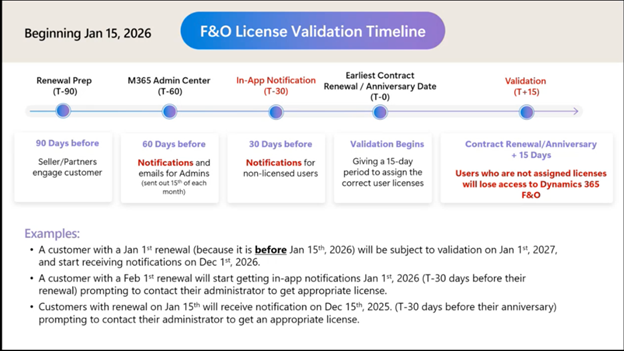
This means the system will actively prevent access if a user’s license does not match their role-based privileges. Below is a timeline of Dynamics 365 F&O license validation milestones:
Avantiico's D365 licensing team conducts structured enforcement readiness assessments — identifying your specific exposure, your enforcement date, and a remediation plan you can execute. Most assessments complete in 2–3 weeks and give you clarity before the enforcement window closes. Don't Know Where to Start? Start with a Licensing Audit.
Related Article: How to Reduce D365 Finance and Supply Chain License Costs by 67% by Redesigning the Integration Point
What’s New? 3 New Dynamics 365 Licensing Rules You Should Know
This is not the same enforcement conversation Microsoft was having in 2023. The changes that took effect in 2025–2026 are materially different from previous updates to license enforcement in D365 Finance and Operations in three fundamental ways:
- License assignment is now tied more directly to Microsoft 365 administration and application-level validation.
- Custom security roles are evaluated privilege-by-privilege, which can create unexpected license exposure.
- Enforcement is tied to contract renewal, not a universal date
1. License assignment is now tied more directly to Microsoft 365 administration and application-level validation.
Previously, security roles in D365 were the primary access control mechanism. Now, a valid license must be assigned before a user can access D365 F&SCM, and security roles without the right licensing alignment may not be sufficient once enforcement is active.
2. Custom security roles are evaluated privilege-by-privilege, which can create unexpected license exposure.
Many organizations created custom security roles during implementation. Under enforcement, these roles may be evaluated at the privilege level, which means a single privileged access point can drive a higher license requirement for every user assigned that role.
This is where organizations consistently discover their largest exposure.
3. Enforcement is tied to contract renewal, not a universal date
There is no single date when enforcement hits everyone simultaneously. Microsoft may apply licensing validation based on each customer-specific timing, including renewal or agreement milestones, beginning in January 2026 for the initial wave.
This means your enforcement date depends on when your Enterprise Agreement, CSP agreement, or Direct agreement renews. Organizations with upcoming renewals in the next 90 days are in the highest-risk window.
Why Does Dynamics 365 License Preparation Matter Now?
The practical takeaway is that organizations should review roles, licenses, and renewal timing early, because exposure can surface well before a formal enforcement date.
The 90-day Rule: Why Time is Already Running Out to Prepare for D365 Licensing Enforcement
Microsoft’s D365 license enforcement preparation window may begin 90 days before your contract renewal date. License validation warnings may appear 30 days before renewal. Hard enforcement, actual sign-in blocking, begins at renewal, and a 15-day grace period often follows for compliance.
If your renewal is within 90 days, your preparation window is already open, and you can’t afford to put off learning how to get ready for D365 F&SCM license enforcement.
Avantiico's D365 licensing team conducts structured enforcement readiness assessments — identifying your specific exposure, your enforcement date, and a remediation plan you can execute. Most assessments complete in 2–3 weeks and give you clarity before the enforcement window closes. Don't Know Where to Start? Start with a Licensing Audit.
Dynamics 365 License Enforcement Timelines: What’s the Difference Between Soft vs. Hard D365 License Enforcement?
Microsoft has implemented a phased approach to enforcement designed to give organizations time to comply, but the phases move faster than most IT and finance teams expect.
When learning how to prepare for D365 F&SCM license enforcement, you will encounter hard and soft deadlines. Understanding the difference iscritical to knowing how much time you actually have. Here’s the difference between soft enforcement and hard enforcement.
Soft Enforcement: Alerts and Warnings
Soft enforcement does not block users. It surfaces in-app notification banners warning that a user’s license does not match their security role entitlements. These banners often start appearing 30 days before each customer’s contract renewal date in 2026.
Many organizations perceive warning banners as optional or dismissible. Do not make this grave mistake. They are a countdown, and they serve asthe last signal before access is restricted.
Hard Enforcement: Access Restriction and Sign-In Blocking
Hard enforcement means users without a valid, correctly assigned license may be blocked and can be restricted from signing in to Dynamics 365 Finance & Supply Chain.
In practice, Microsoft’s rollout can happen in phases and may be tied to renewal timing or customer-specific enforcement milestones. Instead of relying on banners or grace periods, organizations should assume that remediation needs to happen early.
The safest approach is to review security roles, custom privileges, and assigned licenses far before renewal, so you can correct exposure before enforcement. For some tenants, enforcement may begin with notifications and progress to stronger access restriction if issues are not fixed.
Because timing can vary, it is better to treat every renewal window as a licensing review deadline. Now, let’s dive into the impact of D365 F&O license enforcement.
Avantiico's D365 licensing team conducts structured enforcement readiness assessments — identifying your specific exposure, your enforcement date, and a remediation plan you can execute. Most assessments complete in 2–3 weeks and give you clarity before the enforcement window closes. Don't Know Where to Start? Start with a Licensing Audit.
What D365 F&SCM Licensing Enforcement Means for Your Organization
Once Dynamics 365 licensing enforcement activates for your tenant, here are the real-life business impacts you will feel:
- Users without a valid license will be blocked from signing in
- Security roles alone will not grant access
- License assignment must occur in the Microsoft 365 Admin Center
- Service accounts, test users, and integrations must be reviewed
- Over‑licensed users will increase costs; under‑licensed users will lose access
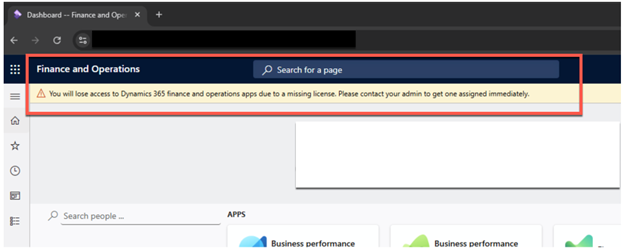
Microsoft will also surface in‑app warnings ahead of enforcement, such as:
“You will lose access to Dynamics 365 Finance and Operations apps without a valid license.”
These warnings are not optional; they are the countdown clock to Microsoft D365 License Enforcement.
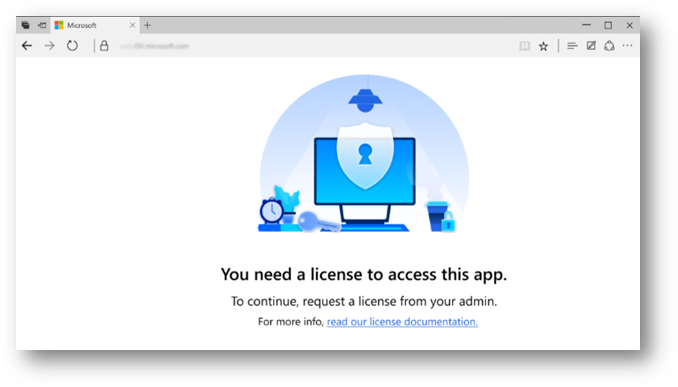
Below are 2 real-life, visual examples of Dynamics 365 Finance and Operations license enforcement:

Related Article: Enabling Telemetry in Dynamics 365 to Optimize Security Roles & Licensing
8 Signs Your D365 Licensing Setup Is at Risk During Enforcement
Most organizations don’t know they have a problem until a warning banner appears, or worse, until after a user is already locked out. Here are 8 Dynamics 365 licensing configuration red flags that create enforcement exposure in the large majority of D365 environments we see:
- Users with roles but no license: Security roles assigned with no corresponding license in the Microsoft 365 Admin Center are a major source of D365 licensing exposure. They will be blocked immediately upon enforcement. There is no grace period in this scenario.
- Over-assigned security roles: Users given broad roles “just in case” or for convenience during implementation are another source. A single high-privilege role assignment can push a user into a higher license tier, even if they never use that functionality.
- Custom roles with undocumented privileges: Custom security roles created during go-live that haven’t been reviewed since also create considerable D365 licensing risk. Custom roles are evaluated privilege-by-privilege under enforcement, not as a unit. A single misconfigured privilege changes the license requirement.
- Inactive users who are still licensed: Former employees, contractors, or seasonal workers whose accounts were never deactivated add Dynamics 365 licensing risk. These inflate your license count and create compliance gaps auditors flag immediately.
- Service accounts and integrations: Integration accounts, batch job users, and system service accounts that access D365 through programmatic means are another source of Dynamics 365 licensing exposure. These may require Activity, Device, or non-interactive licensing depending on what actions they perform.
- ISV add-ons extending base privileges: Third-party ISV solutions installed on top of D365 often extend security roles with additional privileges that trigger higher-tier license requirements, without the IT team realizing the change occurred.
- Team Members performing Full User actions: Users licensed as Team Members who have been assigned roles that allow them to create or post transactions are an extremely common scenario that directly violates the license entitlement and triggers enforcement.
- No version update completed: Organizations running versions below 10.0.44 cannot access the full User Security Governance toolset needed to accurately identify and remediate mismatches before enforcement. The audit itself requires the right version.
If even just a few of the above signs resonate with you, it is time to start learning how to prepare for Microsoft D365 Finance and Supply Chain license enforcement. If you are still unconvinced, however, let’s dive into some real-life consequences of failing to maintain D365 license compliance.
Avantiico's D365 licensing team conducts structured enforcement readiness assessments — identifying your specific exposure, your enforcement date, and a remediation plan you can execute. Most assessments complete in 2–3 weeks and give you clarity before the enforcement window closes. Don't Know Where to Start? Start with a Licensing Audit.
Related Article: Dynamics 365 Finance & SCM 10.0.47 Update: New Features, Enhancements, & Platform Updates
What Are Business Consequences of Not Preparing for License Enforcement in Dynamics 365 F&SCM? [ 4 Consequences ]
Failure to comply with and prepare for Dynamics 365 license enforcement often results in automated restrictions of business-critical processes.
As such, when your enforcement date activates, and users are found to be unlicensed or under-licensed, you face serious company consequences.The financial cost of not upholding Dynamics 365 Finance and Supply Chain Management license compliance compounds quickly.
Emergency license purchases made under deadline pressure are rarely optimized. Organizations often overbuy to restore access fast, then spend months cleaning up the cost structure afterward.
Even worse, during disruptions, the operational cost of downtime during close periods or peak operations seasons can easily exceed the cost of the licenses themselves. Here are 4 real-life business consequences of not being prepared for license enforcement in D365 F&SCM:
- Microsoft audit exposure — documented license mismatches that predate enforcement create retroactive compliance liability under your Customer Agreement.
- Internal audit findings — access control failures and unauthorized system access become audit findings that require formal remediation plans.
- Board-level escalation — operational disruption significant enough to affect financial reporting timelines becomes a board-level risk event.
- Contractual penalties — in some cases, historical non-compliance revealed through enforcement audits can trigger penalties under the terms of your Microsoft agreement.
Avantiico's D365 licensing team conducts structured enforcement readiness assessments — identifying your specific exposure, your enforcement date, and a remediation plan you can execute. Most assessments complete in 2–3 weeks and give you clarity before the enforcement window closes. Don't Know Where to Start? Start with a Licensing Audit.
The Three-Phase Framework for Dynamics 365 License Enforcement Preparation
Before walking through the 8 steps of how to get ready for D365 license enforcement in detail, it helps to organize this process into three distinct phases. Because sequencing matters.
The goal is to first understand your licensing exposure, remediate mismatches, then prepare your team and systems for enforcement. Here is an overview of the different phases required to prepare for license enforcement in Dynamics 365 Finance and Supply Chain Management.
Phase 1: Audit & Analysis
Everything starts here. You cannot remediate what you haven’t measured.
This phase uses the Power Platform Admin Center (PPAC) and the User Security Governance (USG) workspace to build a complete picture of your current licensing state:
- Run the License Usage Summary in PPAC to identify assigned vs. required license gaps
- Microsoft’s current documentation places the report under System administration > Security > Security Governance > License usage summary inside Finance and Operations, while the report itself is described as a telemetry-driven view.
- Audit all user roles and security privileges against the Microsoft Licensing Guide
- Identify high-risk users, specifically those with multiple roles across different modules
- Remove or reassign licenses from inactive users, service accounts, and users no longer requiring access
Phase 2: Remediate & Optimize
With a clear picture of your gaps, this phase closes them in the right order. Remediation is not just buying more licenses. It’s aligning role structure with your entitlements, then filling gaps:
- Align security roles with license entitlements and ensure Team Member users are not performing Full User-level actions
- Assign correct licenses for every active user in the Microsoft 365 Admin Center (Please note: While advisable, this is not a requirement)
- Verify device licensing for warehouse workers, kiosk users, and shared-device environments; consider this more of a review item and not a guaranteed enforcement rule
- Reconcile total license count and identify where the base-and-attach model reduces cost
Phase 3: Prepare for Enforcement
With your environment remediated, the final phase prepares your team and systems for the enforcement event itself:
- Test your updated role and license configuration in a sandbox environment before applying to production
- Establish ongoing monitoring so new role assignments don’t create new mismatches after enforcement
- Coordinate with your Microsoft CSP or partner on license reconciliation before your renewal date
- Communicate the enforcement timeline and process to users, managers, and business operations leaders
The 8 steps in our D365 license compliance guide below walk through each of these D365 F&SCM license compliance phases in operational detail.
How to Prepare for Dynamics 365 Finance & Supply Chain License Enforcement [9 Essential Steps for Businesses ]
Enforcement is tied to your contract timeline, so you cannot afford to perceive D365 license enforcement preparation as an optional luxury. Taking action helps organizations eliminate risk, avoid user lockouts, and take control before enforcement activates.
Here’s how to prepare for Dynamics 365 F&SCM license enforcement in 9 key steps:
- Understand the New Dynamics 365 Finance & Supply Chain Licensing Framework
- Audit All Users Before Enforcement Begins
- Map Security Roles to Required Licenses
- Clean Up Security Role Sprawl
- Assign Licenses in Microsoft 365 Admin Center
- Enable Telemetry and Use Monitoring Tools
- Prepare for Your Enforcement Timeline
- Train Your Teams and Communicate Early
- Establish Ongoing Governance
Avantiico's D365 licensing team conducts structured enforcement readiness assessments — identifying your specific exposure, your enforcement date, and a remediation plan you can execute. Most assessments complete in 2–3 weeks and give you clarity before the enforcement window closes. Don't Know Where to Start? Start with a Licensing Audit.
1. Understand the New Dynamics 365 Finance & Supply Chain Licensing Framework
The first step in how to get ready for Dynamics 365 F&SCM license enforcement is to take a step back and learn. After all, before you can audit anything, your team needs to understand what they’re auditing against. Take advantage of free online resources.
The Microsoft April 2026 Licensing Guide defines which security role privileges map to which license types. Every user must have a license that covers the highest-privilege action their security roles allow them to perform.
Key principle: license requirement is determined by what a user can do based on their roles, not what they actually do day-to-day. A user with a Finance security role who only ever runs reports still requires a Finance license if that role includes posting privileges.
Here are 4 steps to take to ensure you understand the D365 Licensing framework:
- Download and review the Microsoft Dynamics 365 Licensing Guide (April 2026)
- Ensure your IT and finance operations teams understand the privilege-to-license mapping model
- Upgrade to version 10.0.44 or higher to access the full User Security Governance toolset
- Review Microsoft’s User Security Role Reporting & Technical Validation FAQ (March 2026)
For added context, it’s important to also understand the 6 key Dynamics 365 F&O license types:
- Dynamics 365 Finance
- Dynamics 365 Supply Chain Management
- Dynamics 365 Commerce
- Dynamics 365 Project Operations
- Dynamics 365 Human Resources
- Activity and Team Member licenses
Each SKU has specific entitlements, and Microsoft’s telemetry now validates usage against these entitlements continuously, meaning that understanding how this framework works is absolutely essential to Dynamics 365 license enforcement preparation.
2. Audit All Users Before Enforcement Begins
This is the highest-priority action and the one most organizations delay until it’s too late. A comprehensive audit of user access in D365 identifiesevery instance of license/role mismatch before Microsoft’s telemetry flags it, and enforcement begins.
Run reports from the Power Platform Admin Center at Billing → Licenses → Finance & Operations (Power Platform Administrator role required). This gives you assigned vs. required license data across your entire user population.
Here are 6 essential categories that you should use when you audit users in D365:
✔ 1. Users with roles but no license assigned
These users will be blocked immediately upon enforcement with no grace period.
✔ 2. Users with licenses that exceed their actual usage
You should look for cost reduction opportunities like, for example, a Finance license assigned to a user who only needs Team Member capabilities.
✔ 3. Service accounts and integrations
Some may require Device, Activity, or non-interactive licensing, depending on actions performed.
✔ 4. Duplicate, inactive, or orphaned accounts
These accounts inflate licensing costs, compound license bloat, and create compliance gaps, and you should remove or deactivate them.
✔ 5. High-risk, multi-role users
Identify and prioritize users with roles across multiple D365 modules, where combined privileges can unintentionally escalate Dynamics 365 license requirements based on the highest assigned access.
✔ 6. High-risk, multi-role users
Cross‑check licensing audit findings against your EA or CSP renewal date, since enforcement activates at renewal and compresses remediation timelines dramatically.
Reports can be found in Power Platform Admin Center https://admin.preview.powerplatform.microsoft.com/billing/licenses/financeAndOperations(you need to have a Power Platform Administrator role assigned to enter)
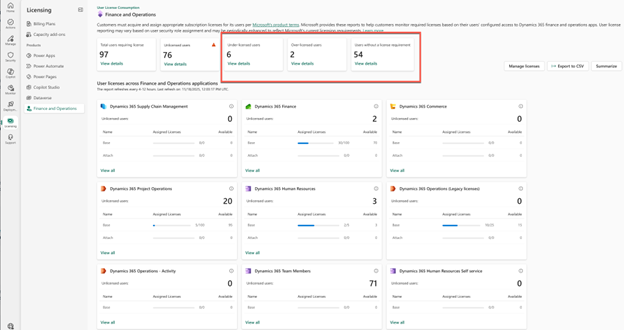
Use the User Activity Aging Report in D365 to identify inactive users. Cross-reference with your HR offboarding records. Former employees are the most common source of orphaned active accounts.
Clearly, understanding Dynamics 365 licensing requirements is essential to preparing for enforcement. Due to its complexity, the best way to ensure all requirements are met and licenses are optimized is to enlist the Dynamics 365 license management and optimization services of a top 1% partner like Avantiico.
3. Map Security Roles to Required Licenses
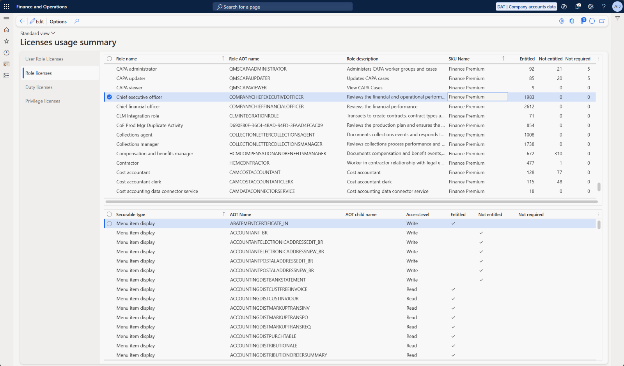
Microsoft’s new User Security Governance (USG) is the primary tool you’ll use for this step. The USG workspace in Dynamics 365 Finance & Supply Chain replaces older tools and provides more accurate privilege-level visibility into:
- Security roles
- Menu items
- Privileges
- Required license types
In other words, with USG, you can gain insights into what each security role requires from a licensing perspective. Here are 7 key steps to map security roles to required licenses:
- USG reports in Lifecycle Services to get role-to-license mapping data
- Review Power Platform Admin Center license insights for current assignment status
- Identify users with multiple roles across different modules (these are your highest-risk licenses for unintended tier escalation)
- Use Microsoft 365 Admin Center to analyze license assignment
- Focus specifically on Team Member users and verify they are not performing actions reserved for Full User licenses
- Document the business justification for each license assignment for future audit defense
- Leverage Avantiico’s role-to-license mapping templates
This mapping ensures each user’s access aligns with Microsoft’s telemetry-based validation.
4. Clean Up D365 Security Role Sprawl
Security role sprawl in Dynamics 365 refers to custom roles from implementation that were never reviewed, roles assigned “just in case,” legacy roles from the original go-live that overlap with current roles, and ISV-added privileges that nobody audited when the add-on was installed.
Under enforcement, every privilege counts. A single high-privilege duty in a custom role changes the license requirement for every user assignedthat role. This is the most common source of unexpected license cost discovered during enforcement preparation.
Here is a short 5-item punch list of what to look for when identifying causes of security role sprawl in Dynamics 365 Finance & Supply Chain Management:
- Custom roles
- Overlapping privileges
- Legacy roles from implementation
- Roles assigned “just in case”
- Invasive ISV’s
To prepare for Dynamics 365 licensing enforcement, you should start with the following 5 steps:
- Remove unused and redundant security roles from the system
- Consolidate custom roles, and validate that each included privilege is actually needed
- Review ISV-added roles and privileges against the license mapping guide
- Align roles with Microsoft’s standard license boundaries wherever possible
- Test role changes in your UAT environment before applying to production – the role changes can inadvertently impact what functionality users can access.
The March 2026 Microsoft FAQ stresses that custom roles do not bypass enforcement. Instead, they are evaluated on a privilege-by-privilegebasis.
5. Assign Licenses in the Microsoft 365 Admin Center
This is the only authoritative location for license assignment. It’s important to understand that assignment in D365 security management does not satisfy the enforcement requirement.
Every user must have the correct license assigned in the Microsoft 365 Admin Center, matching the highest-privilege role they hold in D365. Your provisioning workflow should include:
- Assigning the correct license SKU and security role based on the role-to-license mapping completed in Step 3.
- Validating telemetry alignment and verifying that D365 licensing requirements reflect the highest privilege the user holds, not the primary usecase.
- Reviewing service account licensing; system admin and dedicated service accounts may not require user licenses, but verify in the PPAC report.
- Integrating license assignment into your HR onboarding and offboarding workflows going forward and documenting the user’s business justification
- Implementing a request and approval workflow for license changes to prevent unauthorized self-assignment
Avantiico’s licensing team recommends integrating this into your HR onboarding/offboarding processes.
Avantiico's D365 licensing team conducts structured enforcement readiness assessments — identifying your specific exposure, your enforcement date, and a remediation plan you can execute. Most assessments complete in 2–3 weeks and give you clarity before the enforcement window closes. Don't Know Where to Start? Start with a Licensing Audit.
6. Enable Telemetry and Use Monitoring Tools
Azure telemetry is one of the most underutilized tools available for license optimization.
By enabling telemetry in System Administration, you can analyze actual usage data to identify users who are licensed at a higher tier than their actual system behavior requires, creating right-sizing opportunities before enforcement crystallizes your current configuration. Here’s how to enable Telemetry and use monitoring tools to prepare for D365 licensing enforcement.
- Enable telemetry in System Administration → Monitoring and Telemetry parameters
- Run usage analysis to identify users with Full licenses performing only Team Member-level actions
- Use Azure telemetry data to validate role-to-license mapping against actual behavior
- Set up ongoing monitoring alerts for users who gain new role assignments that change their license requirement
- Establish a monitoring dashboard (Power BI or PPAC) for continuous compliance visibility
7. Prepare for Your Enforcement Timeline
Enforcement is not universal. It is tied to your contract renewal date. Every organization has a different hard enforcement deadline. So, generally, Microsoft enforcement begins:
- January 15, 2026, and
- Rolls out based on your contract renewal date
In other words, every customer has a different enforcement date. If you don’t know yours, find out today. Work backward 90 days from your renewal date to determine when your preparation window opened, and forward to when enforcement will hit.
Here are 6 steps to prepare for your Dynamics 365 enforcement timeline:
- Identify your Microsoft contract renewal date (Enterprise Agreement, CSP, or Direct)
- Calculate your 90-day preparation window and determine where you are on it
- Complete all audit and remediation work before your renewal date, not after
- Brief executive leadership and business operations leaders on the enforcement date and operational risk
- Test enforcement in your sandbox environment to identify operational bottlenecks before production enforcement hits.
- Coordinate with your CSP or partner on license reconciliation before your renewal.
Failure to prepare can halt:
- Financial close
- Procurement
- Production scheduling
- Warehouse operations
- Retail transactions
8. Train Your Teams and Communicate Early
This is one of the most overlooked components to preparation. Your organization should have a fundamental understanding of:
- Why enforcement is happening
- What changes for users
- How to request a license
- How to request a role change
- Who approves licensing decisions
- What happens if a user is blocked
In our extensive experience helping organizations and business leaders prepare for Dynamics 365 F&SCM licensing enforcement, communication is the #1 factor in avoiding disruption.
9. Establish Ongoing Governance & D365 License Management
Getting compliant for your initial Dynamics 365 team members’ license enforcement date is the first milestone, not the finish line. Microsoft’s enforcement posture is expanding; device licensing enforcement is tightening, and Microsoft has indicated that data storage capacity enforcement is also coming.
The organizations that handle this well build governance structures that sustain compliance, not remediation projects they run every 18 monthsunder pressure.
- Ensure you have a framework for ongoing license management in Dynamics 365 F&SCM
- Implement quarterly license reviews as roles change, users change, and mismatches accumulate over time
- Automate provisioning and deprovisioning workflows tied to HR systems
- Establish role-based access control (RBAC) standards that include license implications in role design decisions
- Review integration account governance with scheduled audits of service accounts and batch job users
- Schedule annual licensing optimization reviews with a top 1% Microsoft Support Partner like Avantiico to right-size your license estate as usage evolves
Avantiico's D365 licensing team conducts structured enforcement readiness assessments — identifying your specific exposure, your enforcement date, and a remediation plan you can execute. Most assessments complete in 2–3 weeks and give you clarity before the enforcement window closes. Don't Know Where to Start? Start with a Licensing Audit.
6 Best Practices for D365 License Compliance
Beyond the 8 steps for how to get ready for Dynamics 365 Finance and Supply Chain license enforcement above, these are the 6 best practices to for Dynamics 365 Finance and Supply Chain Management license compliance that separate organizations with clean enforcement outcomes from organizations that scramble:
- Implement Least-Privilege Security
- Address Custom Roles Manually
- Optimize Roles Before Buying More Licenses
- Prepare Now for Device Licensing
- Engage Your Microsoft Partner Before Renewal
- Review Data Storage Alongside User Licensing
1. Implement Least-Privilege Security
Design and assign security roles based on what users actually need to do their jobs, not what’s convenient, not what IT assigned during implementation, and never revisited. Every privilege assigned above what’s needed is a potential license tier escalation. Least-privilege security isn’t just a compliance best practice; under enforcement, it’s a direct cost management strategy.
2. Address Custom Roles Manually
Custom roles require manual mapping updates during enforcement preparation. Microsoft’s automated license validation tools do not always correctly classify custom roles; they must be reviewed privilege-by-privilege using the USG workspace.
This is tedious and often reveals surprises, but it cannot be skipped. Because of this, many business leaders choose to partner with reputable D365 licensing experts to handle addressing custom roles manually.
3. Optimize Roles Before Buying More Licenses
The reflex when enforcement warnings appear is to buy more licenses. Often, however, the right answer is actually to reduce role assignments first. Many organizations discover during enforcement preparation that 20–30% of their user base is over-assigned.
Over-assigned users means that they hold roles that require Full licenses for actions they never perform. Right-sizing those users to Team Member or Activity licenses can significantly reduce license cost while achieving compliance.
4. Prepare Now for Device Licensing
User licensing is the current enforcement priority, but device licensing enforcement is coming, specifically for warehouse workers, kiosk users, and devices shared by multiple shift workers.
Organizations with significant warehouse or production floor operations should include device licensing in their governance framework now, before the next enforcement wave catches them unprepared. A top 1% D365 licensing support partner like Avantiico can help with precisely that.
5. Engage Your Microsoft Partner Before Renewal
License reconciliation, such as adjusting your purchased license counts to match your actual validated user population, is a conversation that must happen with your Microsoft CSP or partner before your contract renewal, not after.
Post-renewal changes to license counts are subject to contract terms that may limit retroactive adjustments. The optimization conversation is significantly easier, more flexible, and, candidly, far less tense and panicked before you renew.
6. Review Data Storage Alongside User Licensing
While user licensing is the immediate enforcement priority, Microsoft has signaled that data storage capacity enforcement is on the roadmap.
Organizations accumulating years of D365 transaction history without archival policies are building storage overage exposure that will eventually be enforced the same way user licensing is today. Addressing it as part of your licensing governance posture now avoids a future crisis.
When you work with a top 1% D365 license support and database reduction partner like Avantiico, you can rest assured they will leverage the most pertinent and impactful best practices listed above in conjunction with our business compliance guide for how to prepare for Dynamics 365 license enforcement.
Avantiico's D365 licensing team conducts structured enforcement readiness assessments — identifying your specific exposure, your enforcement date, and a remediation plan you can execute. Most assessments complete in 2–3 weeks and give you clarity before the enforcement window closes. Don't Know Where to Start? Start with a Licensing Audit.
3 Mitigation Strategies for Dynamics 365 License Enforcement
Think of the best practices above as your governance foundation, and think of the following mitigation strategies are your tactical response. These are the specific moves to make when you need to guarantee Dynamics 365 license compliance under active enforcement pressure or on a tighttimeline. Here are 3 mitigation strategies for Dynamics 365 license enforcement:
- Optimize Roles to Reduce License Tier Before Buying
- Act on Warning Banners Immediately – Don’t Wait Them Out
- Engage Your Microsoft Partner Before Your Renewal Window
1. Optimize Roles to Reduce License Tier Before Buying
Before purchasing additional licenses to cover enforcement gaps, evaluate whether users can be moved down in license tier by removing unnecessary roles or privileges.
A user currently requiring a full Finance license because of a single seldom-used posting privilege may be reclassifiable as a Team Member if that privilege is removed and they have no operational need for it.
This is one of the highest-ROI actions available during enforcement preparation. It reduces your license gap without adding cost, and simplifies your compliance posture at the same time.
Concretely: review every user flagged as needing a Full User or Finance license and ask whether the role assignment driving that requirement is genuinely needed. In many environments, 20 – 30% of Full User assignments can be converted to Team Member licenses through targeted role cleanup.
2. Act on Warning Banners Immediately — Don’t Wait Them Out
When warning banners appear in D365, the instinct for many teams is to treat them as informational and plan to address them “soon.”
This is the most common mistake in enforcement preparation. Warning banners appear days before enforcement actions, not weeks. The moment a banner appears, your team should be executing the license assignment correction, not beginning the conversation about it.
Establish an internal escalation protocol before enforcement begins: who sees the banner, who owns the fix, what the SLA is for resolution, and who approves emergency license purchases if needed. Having this protocol documented and communicated before the first banner appears is the difference between a managed response and a scramble.
3. Engage Your Microsoft Partner Before Your Renewal Window
The single highest-leverage action available to most organizations before enforcement: a structured conversation with your Microsoft CSP or partner, Avantiico’s licensing team included, to validate your licensing strategy, identify your exposure, and reconcile your license count before your contract renews.
This conversation is exponentially easier before renewal than after.
This is because your D365 licensing support partner can help you understand your entitlement position, identify cost reduction opportunities, and prepare documentation that supports your compliance posture if Microsoft’s telemetry surfaces discrepancies during enforcement.
Post-renewal, many of these options close.
These mitigation strategies are a vital component to learning how to get ready for D365 Finance and Supply Chain Management license enforcement.
Avantiico's D365 licensing team conducts structured enforcement readiness assessments — identifying your specific exposure, your enforcement date, and a remediation plan you can execute. Most assessments complete in 2–3 weeks and give you clarity before the enforcement window closes. Don't Know Where to Start? Start with a Licensing Audit.
What Proactive D365 Licensing Enforcement Preparation Actually Delivers (5 Key Benefits)
Organizations that treat enforcement preparation as a compliance exercise miss the business value. Done properly, preparation for license enforcement in Dynamics 365 F&O also serves as a license optimization exercise, and the savings can be significant.
Strategic Actions for Business Leaders: How to Leverage D365 License Enforcement as a Cost and Security Opportunity
Especially for business leaders, it’s important to reframe your efforts to create a framework around how to get ready for D365 F&SCM license enforcement as a strategic opportunity to reduce costs and maximize efficiency.
Organizations that approach enforcement as a threat to manage miss what it actually is – a forcing function to get your D365 environment into the shape it should have been in since go-live. These strategic actions convert enforcement pressure into long-term operational advantage:
- Use Azure Telemetry to Right-Size Your Entire License Estate
- Optimize Custom Roles as a Structural Fix, Not a Workaround
- Prepare for Device Licensing Before Next Enforcement Wave
1. Use Azure Telemetry to Right-Size Your Entire License Estate
Many people aren’t aware of the capabilities Telemetry offers. Azure Telemetry identifies mismatches and over-allocation.
By analyzing actual user behavior against assigned licenses, telemetry reveals which Full User-licensed employees are performing only Team Member-level actions. In most mature D365 environments, this gap is significant.
Users who were assigned full licenses during implementation “just in case,” and whose actual usage never expanded to warrant them, represent direct cost reduction opportunities.
You should enable telemetry if it isn’t running (System Administration → Monitoring and Telemetry parameters). Then, run a 30-day usage baseline before making any role changes; actual behavior data is far more tangible and defensible than assumption-based adjustments.
2. Optimize Custom Roles as a Structural Fix, Not a Workaround
The goal with custom role optimization is far more than enforcement compliance. With custom role optimization, you are endeavoring to build a role model that won’t require emergency remediation at every renewal.
Roles designed around least-privilege principles reduce both your license tier exposure and your security attack surface, simplify your audit posture, and make future governance reviews faster and cleaner. When you review custom roles during preparation for license enforcement in D365 F&O, document what you find and why you made each change.
This creates an audit trail that demonstrates proactive governance, valuable if Microsoft’s telemetry surfaces questions about your environment during enforcement.
3. Prepare for Device Licensing Before the Next Enforcement Wave
The current D365 team member license enforcement cycle is focused on user licensing. The next cycle will address device licenses, specifically for warehouse workers, kiosk users, shift workers sharing a single device, and production floor terminals.
Organizations with any of these use cases should include device license validation in their current governance review rather than addressing it reactively in 12–18 months under enforcement pressure.
The effort to validate device licensing alongside user licensing now is a fraction of the effort required to address it as a separate crisis later.
Avantiico's D365 licensing team conducts structured enforcement readiness assessments — identifying your specific exposure, your enforcement date, and a remediation plan you can execute. Most assessments complete in 2–3 weeks and give you clarity before the enforcement window closes. Don't Know Where to Start? Start with a Licensing Audit.
We’ll Handle How to Prepare for Dynamics 365 F&SCM License Enforcement Seamlessly, So All You Have to Focus on is Leading with Confidence.
So, now you know the 9 essential steps at the heart of how to prepare for Dynamics 365 license enforcement for organizations. Still, knowing these steps in theory is not the same and being able to apply them safely in practice. Ensuring compliance requires considerable expertise and experience, the right structure, and enough time before your enforcement window closes.
Avantiico’s licensing team has guided D365 customers through enforcement preparation across industries, from initial audit through remediation, license reconciliation, and ongoing governance. Our D365 Licensing Analysis identifies your specific exposure, your enforcement date, and a remediation plan with clear ownership, not a generic checklist.
Schedule a D365 Licensing Assessment today to ensure you are ready for enforcement with absolute D365 Finance and Supply Chain Management compliance.
Want to go deeper before you engage?
Avantiico has hosted two free webinars that walk through how to get ready for Dynamics 365 license enforcement in detail, covering telemetry, the User Security Governance tool, enforcement timelines, and the specific steps organizations need to take before their renewal window closes. Both are available on-demand, for free, and with no registration required:
Free Webinar: D365 Licensing Enforcement — What You Need to Know A comprehensive overview of enforcement mechanics, timelines, and preparation steps. Recommended starting point for any team beginning enforcement preparation.
Free Webinar: D365 Licensing Enforcement 2026 — User Security, Telemetry & Compliance Breakdown A technical deep dive into the User Security Governance tool, telemetry-based validation, and the specific steps for mapping roles to licenses. Recommended for IT Directors and operations leaders responsible for the execution.
FAQs About How to Prepare for Dynamics 365 License Enforcement for Organizations in 2026
What is the 90-day rule for Microsoft Dynamics 365 licenses?
Understanding the 90-day rule is important for those learning how to prepare for D365 license enforcement. The 90-day rule refers to Microsoft’s enforcement preparation window that opens 90 days before your contract renewal date.
During this window, Microsoft begins its license validation process, warning banners appear 30 days before renewal, and hardenforcement, actual sign-in blocking, activates at or shortly after renewal.
Organizations should complete their full audit, role remediation, and license assignment work within this 90-day window, not during the 15-day grace period that follows. Waiting until the grace period is not a strategy; it’s crisis management.
What is the grace period for Dynamics 365 license?
The Dynamics 365 license grace period is typically 15 days after enforcement begins for your tenant. Once Microsoft triggers license validation, usually aligned to your contract renewal or anniversary date, you have a short window to assign the correct Dynamics 365 licenses in the Microsoft 365 Admin Center.
If the correct license is not assigned within that ~15‑day grace period:
- Unlicensed or under‑licensed users may be blocked from signing in
- Users will see access or license request prompts
- Business processes can be disrupted during critical periods (close, procurement, shipping)
The key risk when it comes to license enforcement for Dynamics 365 Finance and Operations is timing: validation does not start when warnings appear.
It’s imperative to understand that it starts when Microsoft enforces licensing for your tenant, and that grace period is brief. Organizations that wait to act during the grace period often find it’s already too late to make clean, low‑risk corrections.
Are users actually getting locked out of D365 Finance & SCM yet?
Yes. Customers report that once their Microsoft contract renewal occurs, users without the correct license assignment are blocked from signing in, even if they previously only saw warnings. This is why Dynamics 365 license compliance should be a top priority for every business leader.
Why did our license warnings disappear after we assigned licenses?
This commonly occurs during temporary validation windows. The disappearance of warnings does not mean enforcement is completeor that your tenant is compliant.
Does enforcement happen immediately when warnings appear?
No. Microsoft applies enforcement in phases, typically beginning 90 days before renewal, with hard enforcement occurring shortly after renewal if discrepancies remain.
Will under‑licensed users lose all access or just certain features?
Early enforcement may restrict feature access first, but customers report full user lockouts once hard enforcement begins.
Can we safely delay fixing this if nothing is broken yet?
That approach works only temporarily. Once enforcement tightens, access loss can be immediate and unplanned, often during critical operational periods.
How does device licensing fit into D365 enforcement?
Device licensing, used for warehouse workers, kiosk users, and shared devices, is currently in the early enforcement phase. Microsoft is validating device licenses, but has not yet applied the same hard blocking enforcement active for user licenses.
However, stricter device license enforcement is expected through 2026.
Organizations with significant warehouse or production floor operations using D365 should include device licenses in their current governance review, rather than addressing them reactively when the next enforcement wave arrives.
How does license enforcement in D365 Finance and Supply Chain Management affect service accounts and integrations?
Service accounts, integration accounts, and batch job users that access D365 programmatically may require licensing depending on the actions they perform.
System Administrator accounts and dedicated service accounts typically do not require user licenses, but this must be verified in the Power Platform Admin Center report rather than assumed. Integration accounts that create, post, or modify D365 records may require an Activity license.
This is an area frequently missed in D365 F&SCM license enforcement preparation audits and can cause integration failures when enforcement activates.
What is Dynamics 365 license validation?
License validation in Dynamics 365 is Microsoft’s technical process for verifying that each user’s assigned license matches the highest‑level privileges granted through their security roles.
Validation compares license assignments in the Microsoft 365 Admin Center against role‑based entitlements in Dynamics 365 using telemetry.
If mismatches are detected, Microsoft can surface warnings, restrict functionality, or block user access entirely once enforcement begins. In simple terms, license validation turns licensing from an audit concept into a real‑time access control mechanism.
Understanding this process is particularly helpful when trying to determine how to get ready for Dynamics 365 Finance and Supply Chain Management license enforcement because it ensures you know what to prepare for.